
TinySpacer v1.0.0
five workspaces, zero setup
A workspace grouper for Windows that can organizes open windows into five switchable groups, no virtual desktops, no tiling manager, no config, lightweight
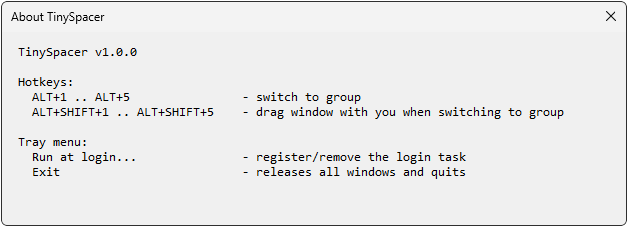
Getting started
- Right-click the executable and select Run as administrator. This is recommended so TinySpacer can also manage windows running with administrator privileges.
- To automatically start TinySpacer when you sign in, right-click its tray icon and select Run at Login. TinySpacer automatically creates a scheduled task in Windows Task Scheduler.
Features
Five groups
Flip between five clean workspaces; windows hide and show on demand.
One tray icon
Always displays your active group number; everything starts in Group 1.
Move anything
Send any window to another group and jump right there with it.
Safe by design
Quitting TinySpacer always restores every hidden window back to your screen.
Downloads
| File | Version | Released | Size |
|---|---|---|---|
| TinySpacer-1.0.0.exe (64-bit) | 1.0.0 | August 29, 2026 | 132 KB |
| TinySpacer-1.0.0.zip (portable) | 1.0.0 | August 29, 2026 | 64.8 KB |
verify download (sha-256)
SHA-256: 3f17a88ad4b64e83bdf4bfb98d6f19fac5c10d5bef766276a9f00078ed8c9b83
certutil -hashfile TinySpacer-1.0.0.exe SHA256